Step-by-Step Installing Cohesity DataProtect Guide
Below is a practical, step-by-step guide (field-ready) based on official docs + deployment guides.
✅ 1. Deployment Models (First decision)
Cohesity DataProtect can be deployed as:
- Physical appliance (Cohesity nodes)
- Virtual Edition (VE) on VMware / Hyper-V
- Cloud Edition (AWS / Azure / GCP)
👉 But installation flow is almost identical after cluster creation
✅ 2. Pre‑Installation Requirements
Before installation, prepare:
Infrastructure
- Cohesity nodes OR VM hosts (vSphere recommended)
- Minimum 3 nodes (production cluster best practice)
Network
- IP addresses (Node IP + Cluster VIP)
- DNS, NTP, Gateway
- VLAN / LACP if required
Services
- Active Directory (optional but recommended)
- SMTP / SNMP (alerting)
👉 Cohesity requires a checklist of network + environment info before deployment [cohesity.com]
✅ 3. Install / Deploy Cohesity Cluster
Option A — Virtual Edition (most common lab/demo)
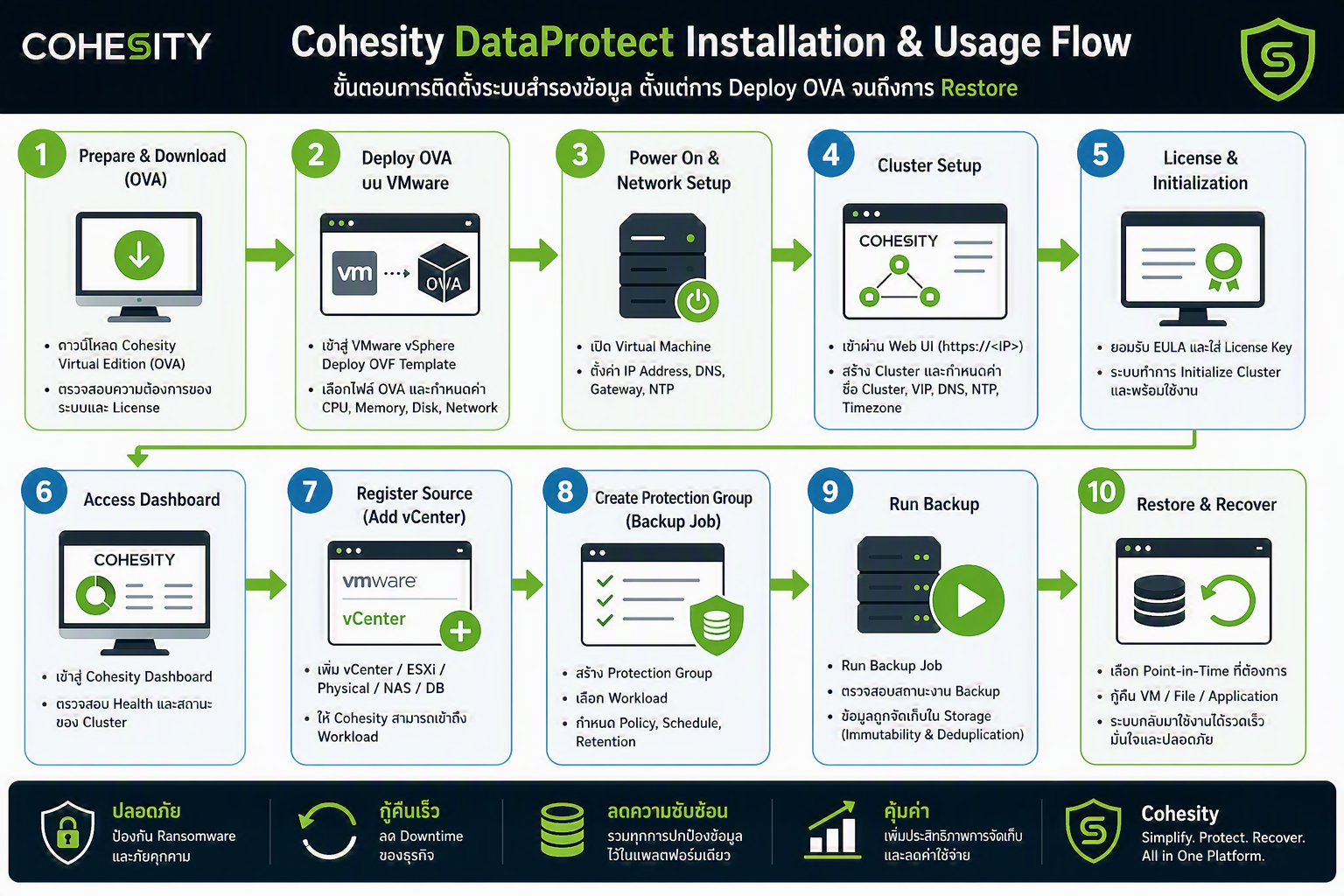
- Download Cohesity OVA file
- Deploy via vSphere
- Configure:
- CPU / RAM / Disk
- Network (IP)
👉 Deployment includes selecting OVA, configuring disks, then powering on VM [youtube.com]
Option B — Physical Appliance
- Rack & cable nodes
- Connect to IPMI / KVM
- Configure network (via CLI or script)
- Access cluster setup UI
✅ 4. Initial Cluster Setup (Critical Step)
Once nodes are powered on:
Step-by-step:
- Open browser → connect to node IP
- Launch Cluster Setup Wizard
- Select nodes
- Configure:
- Cluster Name
- Cluster VIP
- DNS / NTP
- Timezone
👉 Cluster creation includes selecting nodes, assigning VIP, and completing setup process [penguinpunk.net]
- Apply license
- Wait for system to initialize
✅ 5. Post‑Installation Configuration
After cluster is ready:
5.1 Login to UI (Cohesity Dashboard)
- https://<cluster-vip>
5.2 Basic Setup
✅ Add Sources
- VMware vCenter
- Physical servers
- NAS / DB
👉 Sources must be registered before backup jobs can run (seen in deployment workflows) [assets.ctfassets.net]
✅ Create Storage (SmartFiles/View)
- Define backup storage (View)
- Select protocol (NFS/SMB/S3)
👉 Example: create SmartFiles view as backup target
✅ Create Policies
- Gold / Silver / Bronze (default)
- Define:
- Backup frequency
- Retention
✅ Create Protection Group (Backup Job)
- Select workloads
- Assign policy
- Run backup
✅ 6. Optional Add-ons
After basic install:
- Replication (DR cluster)
- Cloud Archive
- FortKnox (cyber vault)
- Helios (SaaS management)
✅ 7. Validation Checklist
Make sure:
- Cluster health = ✅
- Nodes online
- Backup job runs successfully
- Restore test completed
👉 Installation is considered complete only when cluster is ready for backup jobs [cohesity.com]
🔥 Simplified Flow (Executive View)
Prepare infra → Deploy nodes/VM → Create cluster → Configure network
→ Add sources → Create policy → Run backup
💡 Pro Tips (From field experience)
- Always design network & IP plan first
- Start with Virtual Edition for demo/POC
- Enable immutability + security hardening early
- Test restore immediately (not later)
สอบถามรายละเอียดและเงื่อนไขเพิ่มเติม ติดต่อ อีเมล์ contact@cohesityth.com
#Cohesity #CohesityThailand #NetBackup #19xLeader #1Backup #Ransomware #CyberResilience #AI #FortKnot #CohesityDataCloud #CohesityDSPM #DataProtect #DataSecurity
Cohesity ผู้นำด้านความมั่นคงปลอดภัยข้อมูลที่ขับเคลื่อนด้วย AI
Cohesity ช่วยปกป้อง รักษาความปลอดภัย และสร้างข้อมูลเชิงลึกจากข้อมูลของโลก ในฐานะผู้นำด้านความมั่นคงปลอดภัยข้อมูลที่ขับเคลื่อนด้วย AI Cohesity ช่วยให้องค์กรเสริมความยืดหยุ่น เร่งการกู้คืนระบบ และลดต้นทุนด้าน IT
ด้วย Zero Trust Security และเทคโนโลยี AI/ML ขั้นสูง Cohesity Data Cloud ได้รับความไว้วางใจจากลูกค้ามากกว่า 140 ประเทศ รวมถึง 70% ของ Global 500 และได้รับการสนับสนุนจากผู้นำอุตสาหกรรมอย่าง NVIDIA, Amazon, Google, IBM, Cisco และ HPE
Cohesity ยังได้รับการรับรองเป็น Great Place to Work ในหลายประเทศ
ติดตาม Cohesity ได้ที่ LinkedIn ,Facebookและเยี่ยมชม www.cohesity.com หรือ เพื่อข้อมูลเพิ่มเติม
สอบถามข้อมูล ติดต่อ Cohesity Thailand e-mail: contact@cohesityth.com
#Cohesity #CohesityThailand #NetBackup #19xLeader #1Backup #Ransomware #CyberResilience #AI #FortKnot #CohesityDataCloud #CohesityDSPM
Download เอกสาร โปรดติดต่อ CONTACT US ด้านล่างนี้